In our Simple Guide to LoRA, we explored the theory behind Low-Rank Adaptation and how it slashes the GPU memory requirements for model training.
Now, let’s put theory into practice. In this guide, we’ll walk through a step-by-step, hands-on tutorial to fine-tune Meta’s Llama 3 (8B) on a custom dataset using Hugging Face, PEFT, and QLoRA (Quantized LoRA) on a single GPU.
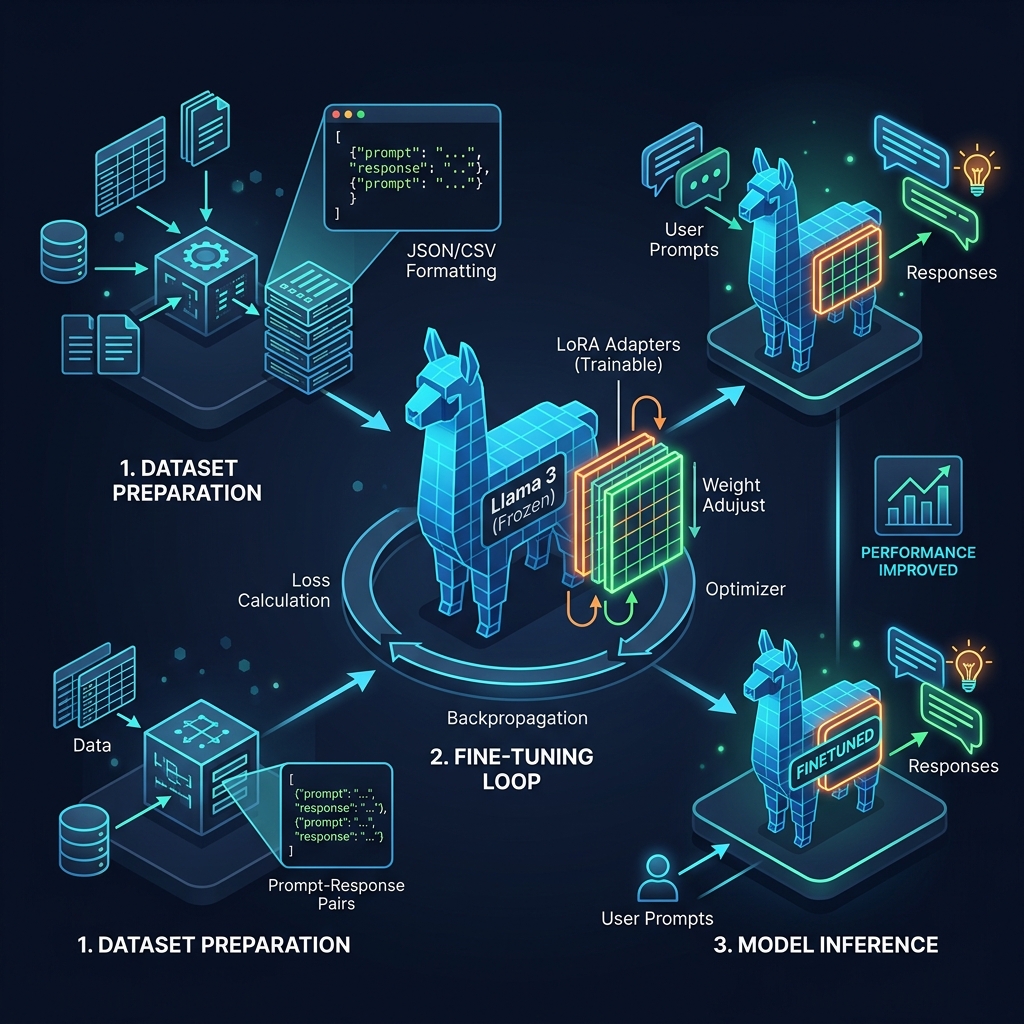
Step 1: Format Your Dataset
To train Llama 3, you need prompt-response pairs. Llama 3 uses a specific chat template format. For custom datasets, the easiest approach is to structure your data as a JSON file containing lists of messages:
[
  {
    "messages": [
      {"role": "system", "content": "You are a helpful customer support assistant."},
      {"role": "user", "content": "How do I reset my password?"},
      {"role": "assistant", "content": "To reset your password, click 'Forgot Password' on the login screen, enter your email address, and follow the link sent to your inbox."}
    ]
  },
  {
    "messages": [
      {"role": "system", "content": "You are a helpful customer support assistant."},
      {"role": "user", "content": "What is your refund policy?"},
      {"role": "assistant", "content": "We offer a full refund within 30 days of purchase. Please contact support with your invoice to initiate the process."}
    ]
  }
]
Save this as dataset.json.
Step 2: Set Up Your Environment
You will need a GPU with at least 12–16 GB of VRAM (such as an RTX 3090, 4080, or A10G). First, install the required libraries:
pip install -q -U transformers datasets accelerate peft trl bitsandbytes
Step 3: Load the Model with 4-bit Quantization (QLoRA)
To make fine-tuning even more efficient, we combine LoRA with 4-bit quantization, a method known as QLoRA. We use the bitsandbytes library to load the base Llama 3 model in 4-bit precision, leaving plenty of memory for training:
import torch
from transformers import AutoModelForCausalLM, AutoTokenizer, BitsAndBytesConfig

model_id = "meta-llama/Meta-Llama-3-8B-Instruct"

# 1. Configure 4-bit quantization
bnb_config = BitsAndBytesConfig(
    load_in_4bit=True,
    bnb_4bit_quant_type="nf4",
    bnb_4bit_compute_dtype=torch.bfloat16,
    bnb_4bit_use_double_quant=True
)

# 2. Load the base model and tokenizer
tokenizer = AutoTokenizer.from_pretrained(model_id)
tokenizer.pad_token = tokenizer.eos_token
tokenizer.padding_side = "right" # Important for instruction-following models

model = AutoModelForCausalLM.from_pretrained(
    model_id,
    quantization_config=bnb_config,
    device_map="auto"
)
Step 4: Configure the LoRA Adapters
Next, we configure our trainable Low-Rank matrices. We specify which layers in the Transformer to target (mostly the projection layers in the self-attention blocks):
from peft import LoraConfig, get_peft_model

peft_config = LoraConfig(
    r=16,                       # Rank matrix size
    lora_alpha=32,              # Scaling parameter
    lora_dropout=0.05,
    bias="none",
    task_type="CAUSAL_LM",
    target_modules=["q_proj", "k_proj", "v_proj", "o_proj", "gate_proj", "up_proj", "down_proj"]
)
Step 5: Start the Training Loop
We use the SFTTrainer (Supervised Fine-Tuning Trainer) from the trl library. It handles formatting the dataset using Llama 3’s chat template and manages the training steps seamlessly:
from datasets import load_dataset
from trl import SFTTrainer
from transformers import TrainingArguments

# Load the local dataset
dataset = load_dataset("json", data_files="dataset.json", split="train")

# Define training parameters
training_args = TrainingArguments(
    output_dir="./results",
    num_train_epochs=3,
    per_device_train_batch_size=4,
    gradient_accumulation_steps=2,
    optim="paged_adamw_8bit",    # Memory-optimized optimizer
    learning_rate=2e-4,
    weight_decay=0.001,
    fp16=False,
    bf16=True,                  # Use bfloat16 for Llama 3 if your GPU supports it
    logging_steps=10,
    save_strategy="epoch",
    report_to="none"            # Change to "wandb" or "tensorboard" if desired
)

# Initialize trainer
trainer = SFTTrainer(
    model=model,
    train_dataset=dataset,
    peft_config=peft_config,
    dataset_text_field="messages",
    max_seq_length=512,         # Set max length based on dataset requirements
    tokenizer=tokenizer,
    args=training_args,
)

# Run the training loop!
trainer.train()
Step 6: Save and Test the Tuned Model
Once training is complete, save the tiny trained adapter weights (only about 50-100 MB):
trainer.model.save_pretrained("./llama3-custom-support")
tokenizer.save_pretrained("./llama3-custom-support")
To run inference, load the base model and then load the adapter weights on top:
from peft import PeftModel

# Load base model
base_model = AutoModelForCausalLM.from_pretrained(model_id, quantization_config=bnb_config, device_map="auto")

# Merge adapter weights
finetuned_model = PeftModel.from_pretrained(base_model, "./llama3-custom-support")
Conclusion
By combining 4-bit quantization with LoRA, the entire fine-tuning process for Llama 3 can run on a single 16GB GPU in under an hour for small datasets, keeping memory usage minimal.
This post is part of the AI Guides series. Check out the Simple Guide to LoRA and A Simple Guide to LLM Serving for more guides on deep learning.